


How to convert WAV files to MP3
How to convert WAV to MP3? As we know, the WAV Audio format is the IBM and Microsoft audio file format for audio accumulation on PCs. It is used extensively in Microsoft Windows. Though this is the highest quality audio format available for any computer, it occupies vast spaces when saved. You may probably have the need to convert WAV to MP3 songs. Here we would like to show you how to simply convert WAV to MP3 using 4Medial MP3 converter.
How to convert WAV to MP3 music using 4Media MP3 Converter?
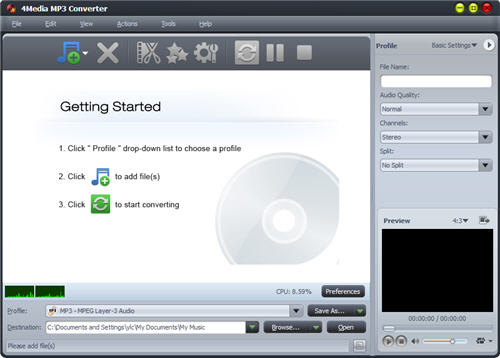
Step1. Load the WAV files to software windows
After install and launch 4Media MP3 Converter, you would see the interface as below.
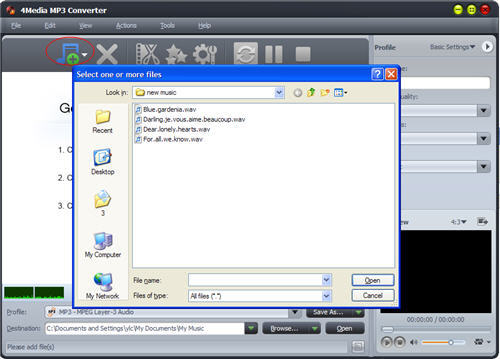
Step2. Segment clip, audio effects, MP3 parameter settings(Optional)
For beginners, you can go to step3 for simple WAV to MP3 converting. And if you are experienced users, you can customize the output MP3 in your way following the steps below.
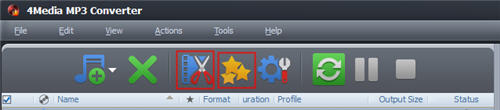
The first "clip" button - clip the source files if you want to pick up a specific segment to convert. The second "effects" button - add Fade In/Out, Chorus, etc. effects on target MP3.
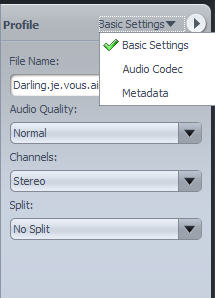
You are also allowed to change the MP3 profile settings and choose these parameters on the profile board according to your need.
Step3. Start the WAV to MP3 conversion
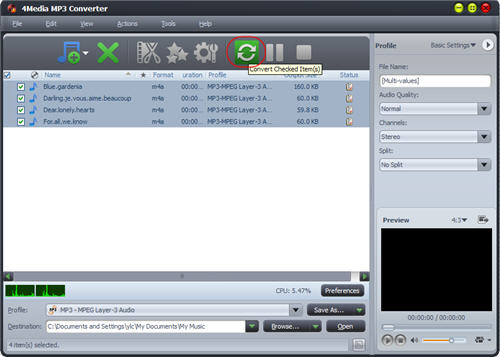
Click "Convert" button to start the WAV to MP3 conversion and in a few minutes the conversion would be completed with great audio quality reserved.
See what 4Media MP3 Converter also features?
1. Built-in Media Player
Offers you a built-in media player to play the video and audio files and take video snapshot anytime during playing.
2. MP3 Conversion in Background
Setting this MP3 converter to work in the background will spare more CPU resources for other applications.
3. Post-Conversion Actions
Save your time greatly by presetting the program to auto exit, shut down, stand by, or hibernate your PC after a task is complete.
4. Multiple Interface Languages
The interface languages include English, German, Spanish, French, Japanese, Simplified or Traditional Chinese.
