


How to convert MP3 to iPhone ringtone on Mac
Wanna convert a MP3 song to iPhone ringtone? 4Media iPhone ringtone maker for Mac would lend you a hand. This Mac iPhone ringtone maker can convert nearly all the video and audio formats to M4R (iPhone ringtone format) especially MP3 to iPhone ringtone. What's, you can upload the converted ringtone to your iPhone simply with this software.
First, free download 4Media iPhone Ringtone Maker for Mac:
Download iPhone Ringtone Maker for Mac
Install and launch the software. Ok, let's start.
How to convert MP3 to iPhone ringtone on Mac?
Step 1: Add the MP3 song you want to convert
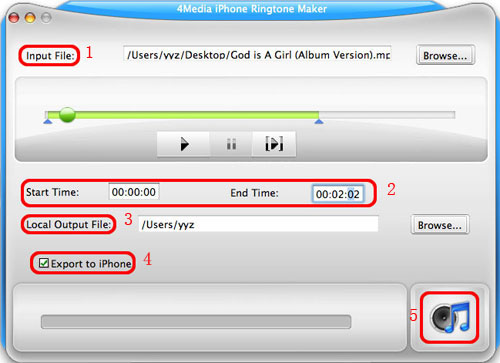
Click the "Browse" button right beside "Input File" label and choose the MP3 song on your Mac you want to convert as iPhone ringtone. Then click "OK" button and you will see the file path and name are displayed in the "Input File" textbox.
Step 2: Clip a part of the song to convert
If you want to choose a part from the song as your iPhone ringtone, follow this step; or else just go to step 3.
Step 3: Set output destination folder
As picture above shows, click "Browse" button on the right side of the "Local Output File" label to set output destination folder.
Step 4: Check the "export to iPhone" option
If you want, check "Export to iPhone" option to let the program upload the output ringtone to your iPhone directly after conversion. Surely, you need to keep iPhone connected to your Mac.
Step 5: Start the MP3 to iPhone ringtone converting
After all settings are finished, click "Generate" button to start the MP3 to iPhone ringtone conversion. During the conversion, you can check the converting process through the progress bar.
Change iPhone ringtone and make any music you love as your ringtone. 4Media iPhone Ringtone Maker for Mac makes things so easy.
