


How to convert HD to SD videos on Mac

How to convert HD videos to SD on Mac in a simple way? Here we would like to introduce 4Media HD Video Converter for Mac. This converter is capable of converting most HD videos including HD AVI, H.264/AVC, HD MPEG4 TS, HD MPEG2 TS, HD WMV, HD Quick Time, HD WMV, etc. to other HD and standard video formats (AVI, MPEG, WMV, MP4, MOV, etc)reserving the best video quality.
How to convert HD videos to SD on Mac
1. Install and run 4Media HD Video Converter for Mac
Then launch the software and see the interface as below.
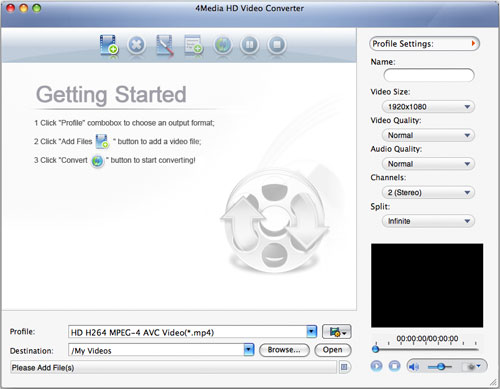
2. Add the HD files you want to convert
Click "Add File" button on the toolbar or "File> Add File" menu to load your files.
3. Choose output format
Choose the loaded file, and click "Profile" drop-down button and scroll to choose the output format from the list.
If you need, click "Browse..." button to set the destination folder for saving output files.
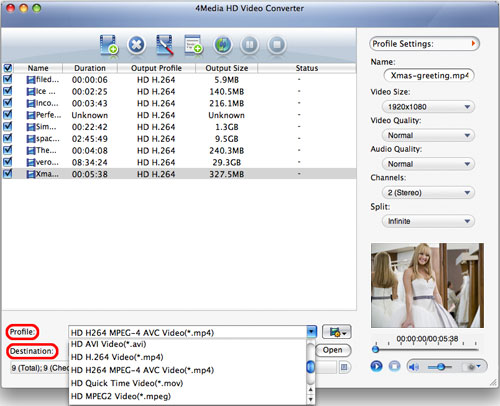
4. Start the HD to SD Converting
After choosing the format you want, now you just need to click "Convert" button on the toolbar to start the task.
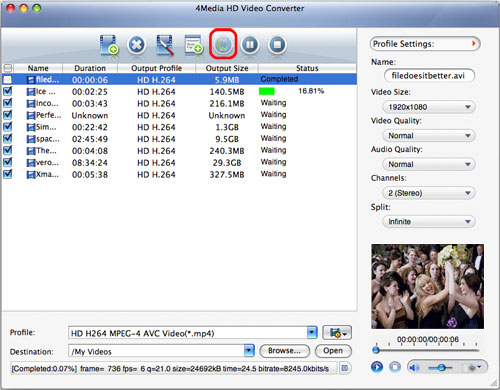
After a few minutes, the conversion would be finished. So simple to convert HD videos to SD on Mac computer.
Additionally, the software provides you with more features to get customized videos.
More usage skills:
1. Clip video segment
2. Add multiple profiles for the same video file
3. Get exact video file size with bitrate calculator
4. Adjust general and advanced profile settings
Click here to check more features included in 4Media HD Video Converter for Mac.
