


How to convert Flac to MP3

As we know, FLAC (Free Lossless Audio Codec) is a popular file format for audio data compression. Being a lossless compression format, FLAC does not remove information from the audio stream, as lossy compression formats such as MP3 and AAC do. And the format becomes more and more popular. Here we would like to show you how to convert Flac to MP3 step by step using 4Media MP4 to MP3 converter.
Free download 4Media MP4 to MP3 Converter and launch the software.
Step 1: Add the Flac file you want to convert
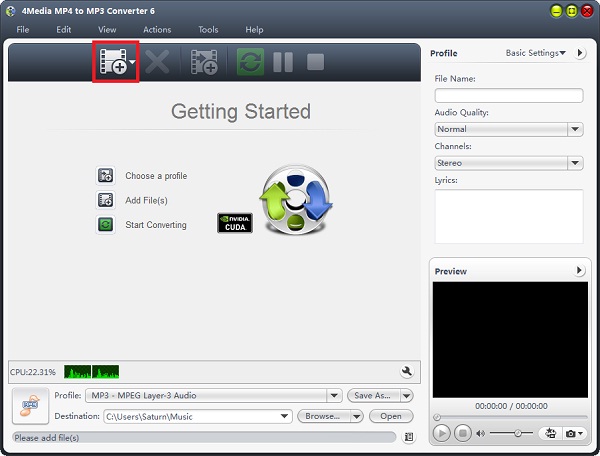
Click the "Add" button to add the Flac audios you want to convert. And the Flac to MP3 converter allows you to add several Flac files to convert at the one time.
Step 2: Click "start" to start the conversion
Click the green "convert" button to start converting the checked Flac files.
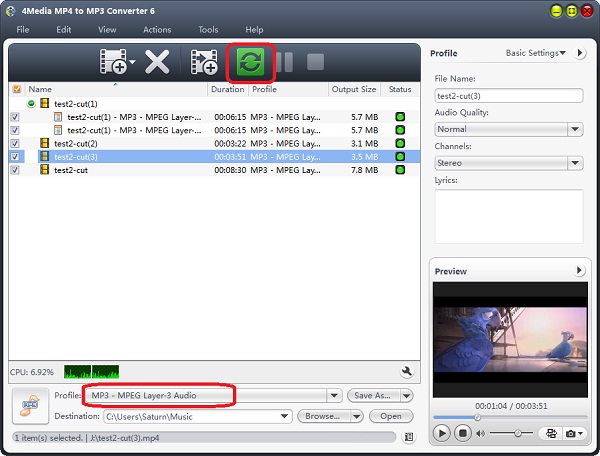
In this converter, you can change the default destination for target MP3 files; and for skilled users, you can set audio quality, channels (mono or stereo) in the right setting panel to get customized MP3 music.
All the conversions would be finished in a few minutes. And then you can click the "Open" button to check the target MP3 files conveniently.
4Meida MP4 to MP3 Converter offers many practical features for users to convert MP3 music:
- Custom Output Size
Compress a large file to the size you want with the Bitrate Calculator, or split a large file into several small segments to better fit your media players. - Convert Only Specified Segments
Set start time and duration to get only the desired segment with this MP4 to MP3 converter. - Get Multiple MP3 files From a Single Source
Output various MP3 files with different settings from a single source. - Edit ID3 tag
Edit MP3 title, author, album, genre, composer, year and other ID3 tag information to help you .
