

How to convert DVD to PSP AVC Video
Watch 480*272 AVC videos on your PSP and not enough sources? You have more video choices since you use 4Media DVD to MP4 Converter. This software can convert DVDs to MP4 compatible with many popular players. And converting DVD to PSP AVC videos can be easily done with the professional DVD to MP4 converter..
Firstly, free download DVD to MP4 Converter, install and launch it. Then let's start.
How to convert DVD to PSP AVC Videos?
Step 1: Load your DVD disc
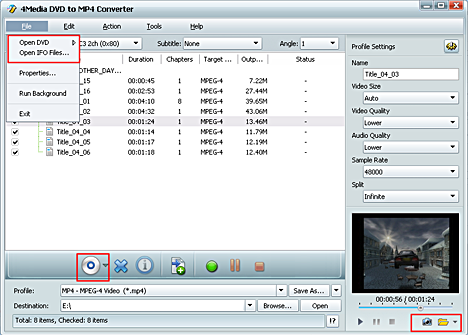
Click “Open DVD” button or File>Open DVD/IFO Files, select a DVD (or DVD Folder, ISO file, IFO file) in the dialog box that opens, and load it. The Loaded DVD’s information, such as chapter, title, etc., will be shown in the file list.
Step 2: Output format and settings
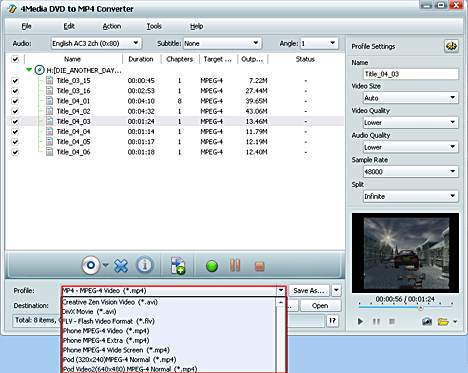
Select one or more files in the list, click Profile drop-down button, select an output format for selected files in the drop down list - you can see AVC Video (480*272) (*.mp4) and PSP AVC Video Format (*.mp4) *(Video size :368*208) provided in the list. Choose the one you want.
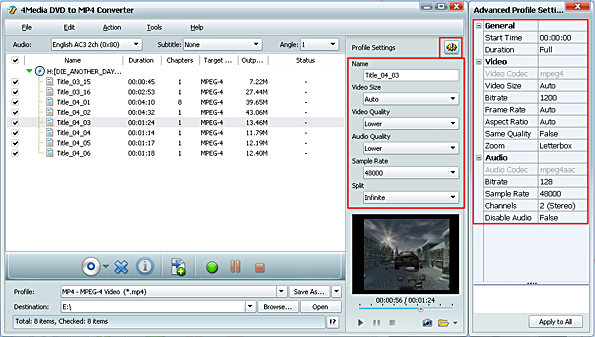
If you are a veteran user, besides the DVD audio, subtitle, and angle, you can further customize the videos by setting output video size, video quality, and channels in Advanced profile setting panel.
Step 3: Start DVD to PSP AVC converting
After finishing the above settings, just click the green "Start Ripping" button on the main interface to start converting. You can view the ripping progress in the progress bar at the bottom of the window. And when the "completed" status shows and the conversion finished, you can just click the "open" button to check the converted videos. Put them on your PSP and watch the excellent quality DVD movie on your palm.
Free download DVD to MP4 Converter here!

Tips
- Convert MPEG2 to MPEG4
- Convert MPEG2 to AVI
- Convert MPEG4 to MPEG2
- Convert MPEG2 to WMV
- Convert VOB to MPG Video
- Convert DVD to MPEG2
- Convert DVD to H.264
- Convert DVD to MPEG1
- DVD to PSP AVC
- Convert DVD to iRiver
- Rip DVD to Blackberry
- Rip DVD to mobile phone
- Convert DVD to DivX AVI
- Rip DVD to creative zen
- Convert DVD to Archos
- Convert DVD to PSP MP4
- Convert DVD to MPEG-4
- Rip Blu-ray to PS3
- Rip Blu-ray to hard drive
- Rip Blu-ray to DVD
- Rip Blu-ray to DivX
- Rip Blu-ray to MP4
- Convert ASF to iPhone Mac
- VOB to iPhone format Mac
- Convert 3GP to iPhone Mac
- MOV to iPhone MP4 Mac
- WMV to iPhone MP4 Mac
- Convert AVI to iPhone Mac
- Transfer iPod to Mac
- Transfer iPod to iPod Mac
- Copy iPod to iTunes Mac
- Transfer from Mac to iPod
- Convert MOV to MP4 Mac
- Convert WMV to MP4 Mac
- Convert 3GP to MP4 Mac
- Convert VOB to MP4 Mac
- Convert AVI to MP4 Mac
- Convert ASF to MP4 Mac
- Convert DAT to MP4 Mac
- Convert AVCHD to WMV
- Convert AVCHD to MOV
- Convert AVCHD to AVI
- Convert H.264 to AVI
- Convert H.264 to WMV
- Convert H.264 to DivX
- Convert HD video to SD
- Convert M2TS to AVI
- Convert M2TS to WMV
- Convert M2TS to MPEG
- Convert M2TS to MOV
- Convert WMV to MP4
- Convert MOV to MP4
- Convert QuickTime HD
- Convert MKV to MP4
- Convert AVI to iPhone MP4
- Convert AVI to iPod Touch
- Convert video to Zen
- Convert Video to Archos
- Convert FLV to MP4
- Convert RM to MP4
- Convert VOB to MP4
- Convert ASF to MP4
- Convert AVI to MP4
- Convert ASF to MP3
- Convert OGG to MP3
- Convert RM to MP3
- Convert M4V to MP3
- Convert MOV to MP3
- Convert WMA to MP3
- Convert MKV to MP3
- Convert FLV to MP3
- Convert WMV to MP3
- Convert MP4 to MP3
- Convert AVI to MP3
- Copy DVD to DVD on Mac
- Burn ISO to DVD on Mac
- Backup DVD to ISO Mac
- Rip DVD to MOV Mac
- Rip DVD to MPEG Mac
- Rip DVD to AVI Mac
- Rip DVD to DivX Mac
- Convert VOB to AVI Mac
- Convert WMV to AVI Mac
- Convert MKV to AVI Mac
- Convert MKV to MP4 Mac
- Convert AVI to MP4 Mac
- Convert AVI to MPEG Mac
