


How to convert DVDs to MPEG2 format
How to convert DVDs to MPEG2 format? As all-in-one DVD converting software, 4Media DVD to Video can convert any DVD to all popular video formats. And let's see how to convert DVD to MPEG2 using 4Media DVD to Video.
4Media DVD to Video provides three editions with different features. And you can choose a edition to download according to your will from below. Surely, either of them supports the DVD to MPEG2 converting and they work basically the same way. Click to download for free:
Ultimate - Supports Video Crop, Video special effect
Platinum - Supports Video Clip
Standard - Basic video converting and more.
To know more differences of the three editions: Compare
After downloading, install and launch it. Here we take 4Media DVD to Video Ultimate as example.
How to convert DVDs to MPEG2 videos?
Step 1: Load DVD to the DVD to MPEG 2 Converter
Insert your DVD disk into the DVD-ROM, then 4Media DVD to Video will read the disc automatically and list the content in the window as picture below shows. Also, as you can see, the DVD Converter supports DVD folder, ISO and IFO files as source.
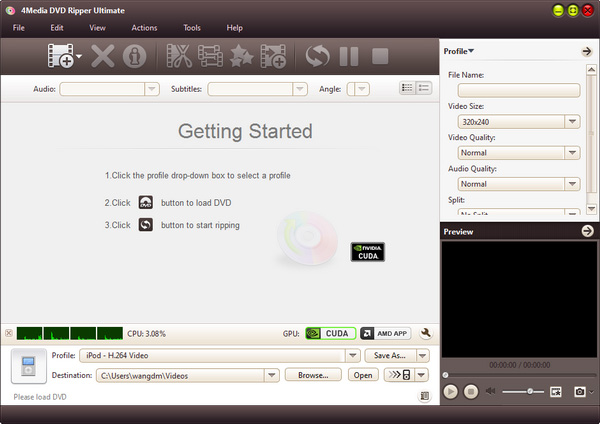
Step 2: Output format and settings
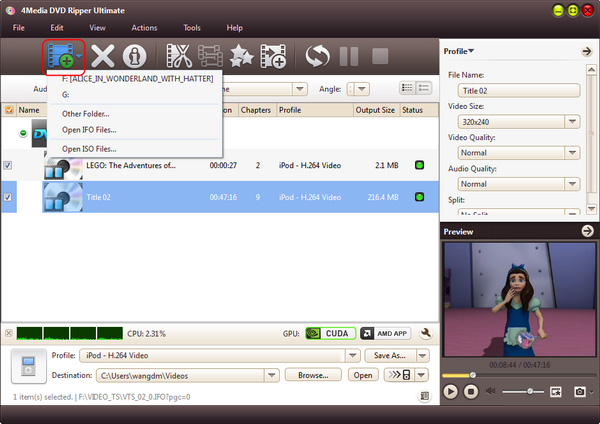
Open the profile drop down list, and set the output format as "MPEG2"- in Common Video category, scroll to choose the "MPEG-2 Movie (*.mpg)" format. Choose DVD Audio, subtitle and Angle on the top settings bar.
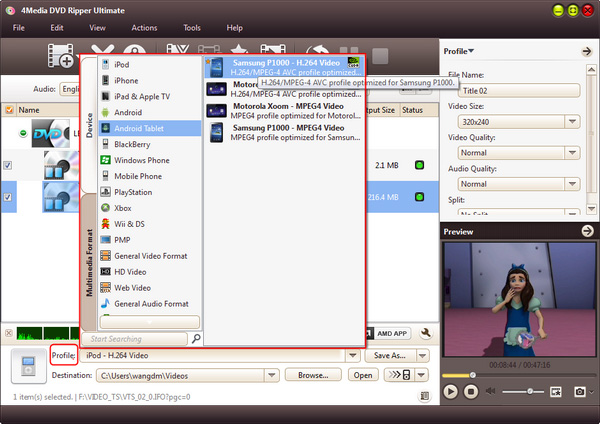
And you can also change the video and audio parameters of the output format including the audio quality, video quality and channels, and define output video size, zoom mode, and bitrate in Advanced Profile Setting panel as picture below shows.
Step 3: Start DVD to MPEG-2 converting
After all settings finished, you can click the green "Start Ripping" button to start the DVD to MPEG-2 conversion.
And for your convenience, when the conversion finished, you can just click "Open" button to directly open the target file directory.
Besides, 4Media DVD Converter offers more features to serve your converting: video water mark, subtitle adjustment, video clip/crop, file split, etc. Click to know more about 4Media DVD to Video for Windows.
