


Guide: 4Media PS3 Video Converter


How to convert video files to PS3/PSP format videos using this PS3 video converter? The following will show you a step by step guides to complete the conversion task.
Step 1: Add File
Click "Add File" button on the toolbar or "File > Add File" to load files.
Step 2: Choose output format
Choose the file, click "Profile" drop-down button to choose the formats you need, then click "Browse" button to choose destination folder for saving output files.
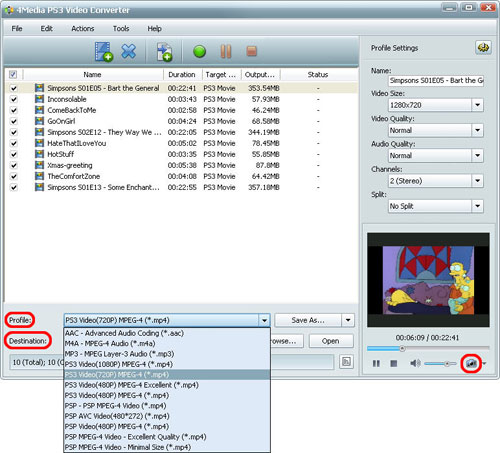
Tip1: Click "Snapshot" button on main interface to take a snapshot when playing the video and save them as common picture formats like BMP, JPEG, GIF, and PNG.
Tip2: If you want to do more with your video and audio files, please refer to the "More usage skills".
Step 3: Convert
After choosing the format, you only need to click "Convert" button on the toolbar to complete the task.
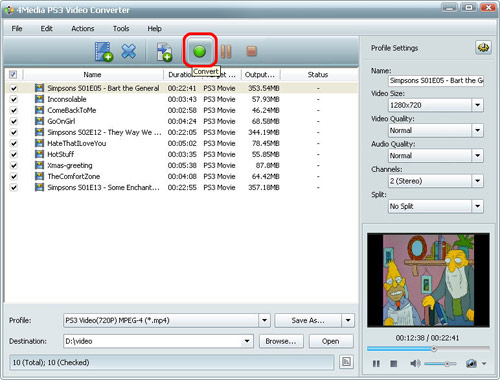
Ok, the above is the easiest function for your conversion. We provide you more abundant skills below!
More usage skills
1. Add profile for the same video file
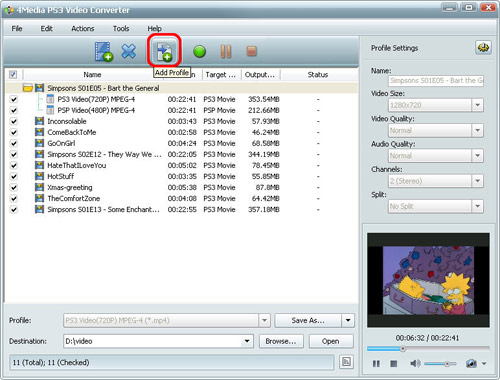
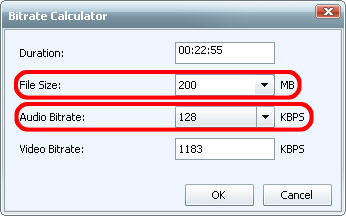
2. Exactly calculate tool
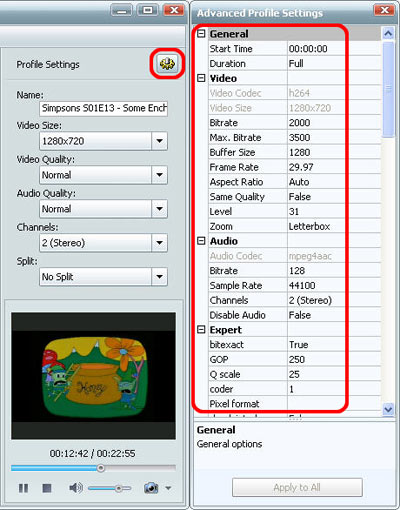
3. Divers parameters for setting

Featured Guides
Guides Categories
Video/Audio Guides
- 4Media Audio Converter Pro Tutorial
- 4Media Movie Editor 6 Tutorial
- Video Converter Ultimate Tutorial
- How to convert DAT to other videos
DVD/CD/Blu-Ray Guides
- 4Media Blu Ray Converter for Mac Tutorial
- How to convert Blu-ray disc to video files
- How to burn AVI, MPEG, VOB, DAT, M2V, MPG to DVD on Mac
- How to burn DivX to DVD on Mac
iPod Guides
- 4Media iPod Max Guide
- How to convert AVI, MPEG to iPod MP4 format
- Guide: 4Media iPod to PC Transfer
- How to convert DVD to iPod on Mac
iPhone Guides
- 4Media iPhone Contacts Transfer for Mac Tutorial
- 4Media iPhone Contacts Transfer Tutorial
- 4Media iPhone Ringtone Maker for Mac Tutorial
- 4Media iPhone Max Guide
iPad Guides
Youtube/Online Video Guides
- 4Media Online Video Converter for Mac Guide
- 4Media Online Video Downloader for Mac Guide
- 4Media Online Video Converter Guide
- 4Media Online Video Downloader Guide
PPT/PDF Guides
Others
Articles
- How to download YouTube videos for free
- How to download/convert YouTube videos to iPod
- How to download and convert YouTube videos
- All features of apple iPhone
- Now you can get more TV offerings from Apple iTunes
- Video Streamer HAVA from Snappy Multimedia
- iPod Growth Driving Demand for Flash Memory
- MediaMan HVX-3500 Review
- Uncertain whether new iPod will be delayed or not because of hurdles
- T3's top five iPod alternatives
- Envivio Exhibits MPEG-4 Solutions from Mobile to HD at CCBN2006