


Guide: 4Media Nokia Ringtone Composer


4Media Nokia Ringtone Composer is capable of making MP3 ringtone from any video or music files and transferring the ringtone to Nokia mobile phone directly after conversion. Here we will guide you to complete the conversion step by step.
Firstly, download, install and launch 4Media Nokia Ringtone Composer. Then, the main interface pops up.
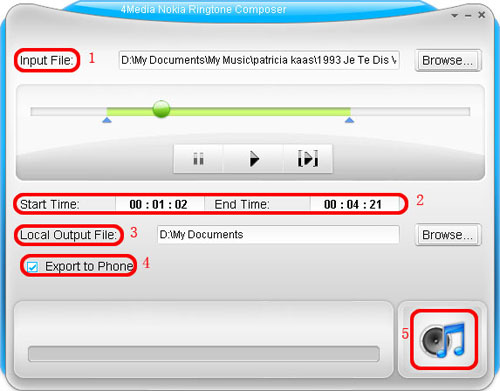
1. Click the "Browse" button right beside "Input File" label to select the file you want to create ringtone in the window that pops up, then click "OK" button. You will see the file path and name are displayed in the "Input File" textbox.
2. Click "Play" button to listen to the music before creating ringtone and find the part you want to use. Then drag and drop the start & end slider to get music clip to convert, or type the start & end time in the corresponding text box directly.
3. Set output destination by clicking "Browse" button on the right side of the "Local Output File" label.
4. If you want, check "Export to Phone" option to let the program upload the output ringtone to your Nokia mobile phone directly after conversion.
5. After all above are finished, click "Generate" button to start creating MP3 ringtone for you Nokia mobile phone. During the creation, you can check the process by the progress bar at the bottom.
Just in a few seconds, you make your own Nokia ringtone from the loved music.

Featured Guides
Guides Categories
Video/Audio Guides
- 4Media Audio Converter Pro Tutorial
- 4Media Movie Editor 6 Tutorial
- Video Converter Ultimate Tutorial
- How to convert DAT to other videos
DVD/CD/Blu-Ray Guides
- 4Media Blu Ray Converter for Mac Tutorial
- How to convert Blu-ray disc to video files
- How to burn AVI, MPEG, VOB, DAT, M2V, MPG to DVD on Mac
- How to burn DivX to DVD on Mac
iPod Guides
- 4Media iPod Max Guide
- How to convert AVI, MPEG to iPod MP4 format
- Guide: 4Media iPod to PC Transfer
- How to convert DVD to iPod on Mac
iPhone Guides
- 4Media iPhone Contacts Transfer for Mac Tutorial
- 4Media iPhone Contacts Transfer Tutorial
- 4Media iPhone Ringtone Maker for Mac Tutorial
- 4Media iPhone Max Guide
iPad Guides
Youtube/Online Video Guides
- 4Media Online Video Converter for Mac Guide
- 4Media Online Video Downloader for Mac Guide
- 4Media Online Video Converter Guide
- 4Media Online Video Downloader Guide
PPT/PDF Guides
Others
Articles
- How to download YouTube videos for free
- How to download/convert YouTube videos to iPod
- How to download and convert YouTube videos
- All features of apple iPhone
- Now you can get more TV offerings from Apple iTunes
- Video Streamer HAVA from Snappy Multimedia
- iPod Growth Driving Demand for Flash Memory
- MediaMan HVX-3500 Review
- Uncertain whether new iPod will be delayed or not because of hurdles
- T3's top five iPod alternatives
- Envivio Exhibits MPEG-4 Solutions from Mobile to HD at CCBN2006