


Guide: 4Media ISO Burner


This guide will show you how to burn ISO image to CD/DVDs. After downloading and installing 4Media ISO Burner on your PC, you can follow the steps below to perform the burning.
Step 1: Run the software and choose source image file
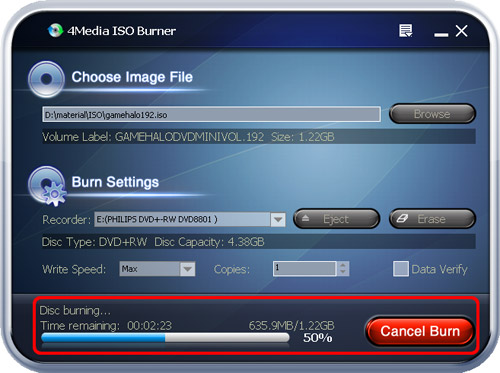
First, run 4Media ISO Burner. Click "Browse" button and select the ISO file you want to burn in the dialog box that appears. The software will list the volume label and file size below.
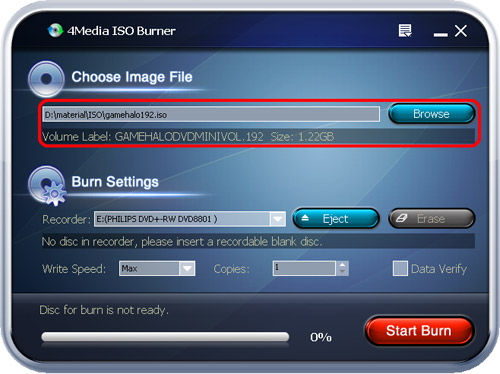
Step 2: Choose Recorder and adjust burning setting
Choose a Recorder and insert a recordable CD/DVD disc. In the info bar, the disc type and disc capacity of your inserted disc will be displayed. If the disc capacity is less than the total size of source image file, the software will remind you to change a larger disc.
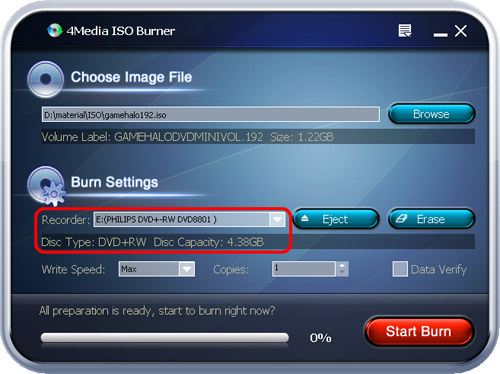
Tips:
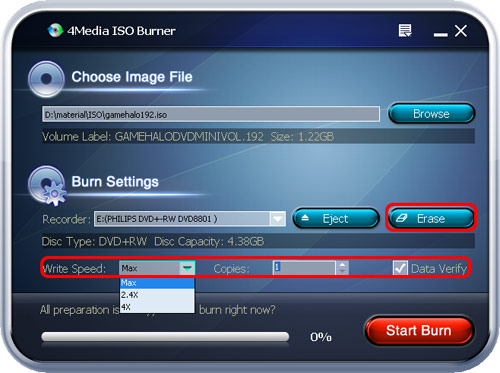
1. The default write speed is the maximum speed that you recorder and disc could support. Also, you can choose a write speed in the "Write Speed" drop-down list.
2. If you want to burn several copies, enter a number you want in the "Copies" box or click the up-and-down arrow to select a number.
3. If you check "Data Verify", the software will verify the data of disc backup to ensure the data usability after finishing the burning.
4. If the rewritable disc you insert is not blank, click "Erase" button to erase the data on the disc.
Step 3: Start burning
After all these finished, click "Start Burn" to start burning.
Tip: If the inserted rewritable disc has data existed and you haven't erased the data yet, the software will remind you that the inserted disc contains files after you click "Start Burn" button, and ask you whether to continue burning. Clicking "OK" will erase data first and start burning automatically after erasing.
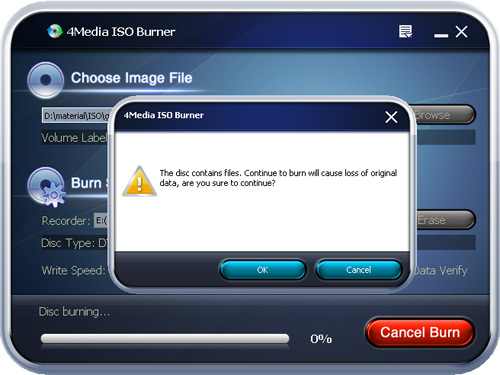
From the status bar on the bottom, you can view the information of the burning process: time remaining, rate of progress, and so on. After burning completed, the disc will be ejected automatically.
Other Functions
1. Drag and drop to add source file
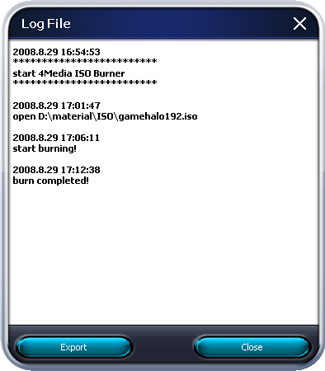
2. View the log
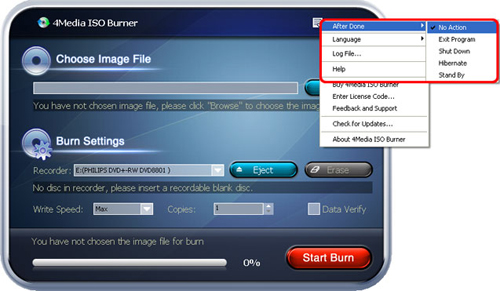
3. Set After Done action

Featured Guides
Guides Categories
Video/Audio Guides
- 4Media Audio Converter Pro Tutorial
- 4Media Movie Editor 6 Tutorial
- Video Converter Ultimate Tutorial
- How to convert DAT to other videos
DVD/CD/Blu-Ray Guides
- 4Media Blu Ray Converter for Mac Tutorial
- How to convert Blu-ray disc to video files
- How to burn AVI, MPEG, VOB, DAT, M2V, MPG to DVD on Mac
- How to burn DivX to DVD on Mac
iPod Guides
- 4Media iPod Max Guide
- How to convert AVI, MPEG to iPod MP4 format
- Guide: 4Media iPod to PC Transfer
- How to convert DVD to iPod on Mac
iPhone Guides
- 4Media iPhone Contacts Transfer for Mac Tutorial
- 4Media iPhone Contacts Transfer Tutorial
- 4Media iPhone Ringtone Maker for Mac Tutorial
- 4Media iPhone Max Guide
iPad Guides
Youtube/Online Video Guides
- 4Media Online Video Converter for Mac Guide
- 4Media Online Video Downloader for Mac Guide
- 4Media Online Video Converter Guide
- 4Media Online Video Downloader Guide
PPT/PDF Guides
Others
Articles
- How to download YouTube videos for free
- How to download/convert YouTube videos to iPod
- How to download and convert YouTube videos
- All features of apple iPhone
- Now you can get more TV offerings from Apple iTunes
- Video Streamer HAVA from Snappy Multimedia
- iPod Growth Driving Demand for Flash Memory
- MediaMan HVX-3500 Review
- Uncertain whether new iPod will be delayed or not because of hurdles
- T3's top five iPod alternatives
- Envivio Exhibits MPEG-4 Solutions from Mobile to HD at CCBN2006