


How The iPod Click Wheel Works from smarthouse.com
One of the key advantages of an iPod is the unique click wheels This touch sensitive ring allows one to navigate easily through the iPod menu.
The iPod Click Wheel is a touch-sensitive ring that you use to navigate through all of iPod's menus and control all of its features. It provides two ways to input commands: by sliding your finger around the wheel and by pressing buttons located under and in the middle of the wheel.
Under the plastic surface of the iPod Click Wheel, there are four mechanical buttons (Menu, back, forward, play/pause), and there's one button in the center (select).
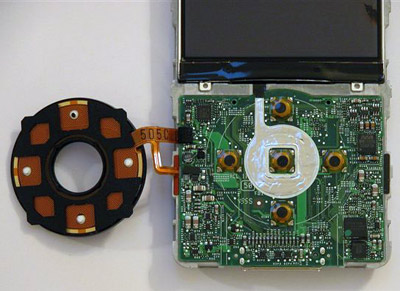
Behind the Click Wheel face (left) and Click Wheel contacts on the motherboard
You've got five buttons and five corresponding contacts on the motherboard. When you press, say, the right side of the wheel while you're listening to a song, the wheel pushes down the forward button. The underside of each rubber button is metal, so pressing it completes the corresponding circuit on the motherboard. The motherboard tells the processor this circuit is complete, and the processor tells the operating system to fast-forward through the song.
The iPod Click Wheel's touch-sensitive function lets you move through lists, adjust volume and fast forward through a song by moving your finger around the stationary wheel. It works a lot like a laptop touchpad. In fact, the company that supplied the Click Wheel for the 4G iPod was Synaptics, most widely known for making laptop touchpads. For the 5G, Apple created its own proprietary Click Wheel design based on the same capacitive sensing principle as the previous Synaptics-designed Click Wheel.
Under the plastic cover of the iPod Click Wheel, there is a membrane embedded with metallic channels. Where the channels intersect, a positional address is created, like coordinates on a graph.
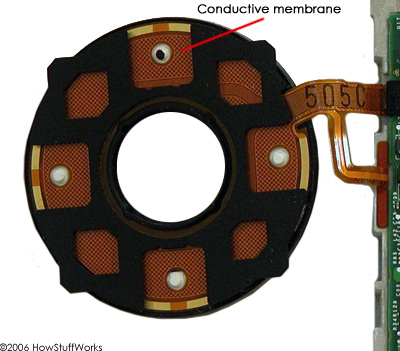
At its most basic, a capacitive-sensing system works like this: The system controller supplies an electrical current to the grid. The metal channels that form the grid are conductors -- they conduct electricity. When another conductor -- say, your finger -- gets close to the grid, the current wants to flow to your finger to complete the circuit. But there's a piece of nonconductive plastic in the way -- the iPod Click Wheel cover. So the charge builds up at the point of the grid that's closest to your finger. This build-up of an electrical charge between two conductors is called capacitance. The closer the two conductors are without touching, the greater the capacitance.
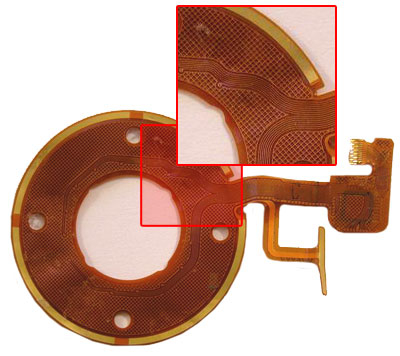
Front of membrane: Here you can see the conductive grid
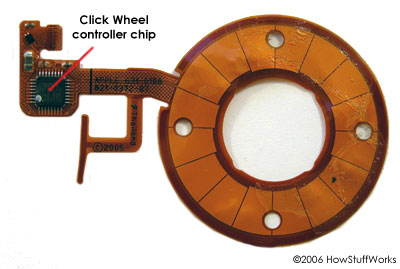
Back of membrane: Here you can see the Click Wheel controller.
The "sensing" part of the system comes in with the controller. The iPod Click Wheel controller (see above) is programmed to measure changes in capacitance. The greater the change in capacitance at any given point, the closer your finger must be to that point. When the controller detects a certain change in capacitance, it sends a signal to the microprocessor. As you move your finger around the wheel, the charge build-up moves around the wheel with it. Every time the controller senses capacitance at a given point, it sends a signal. That's how the iPod Click Wheel can detect speed of motion -- the faster you move your finger around the wheel, the more compacted the stream of signals it sends out. And as the microprocessor receives the signals, it performs the corresponding action -- increasing the volume, for instance. When your finger stops moving around the wheel, the controller stops detecting changes in capacitance and stops sending signals, and the microprocessor stops increasing the volume.
Now, in discussing the workings of the iPod Click Wheel, a particularly curious HowStuffWorks staffer raised the following question: If your finger controls the Click Wheel because your finger is a conductor, why can't you control the Click Wheel with a paper clip?
While we scratched our heads, we embarked on a experiment.
Expand info: How to convert DVD to iPod on Mac computer?

Featured Guides
Guides Categories
Video/Audio Guides
- 4Media Audio Converter Pro Tutorial
- 4Media Movie Editor 6 Tutorial
- Video Converter Ultimate Tutorial
- How to convert DAT to other videos
DVD/CD/Blu-Ray Guides
- 4Media Blu Ray Converter for Mac Tutorial
- How to convert Blu-ray disc to video files
- How to burn AVI, MPEG, VOB, DAT, M2V, MPG to DVD on Mac
- How to burn DivX to DVD on Mac
iPod Guides
- 4Media iPod Max Guide
- How to convert AVI, MPEG to iPod MP4 format
- Guide: 4Media iPod to PC Transfer
- How to convert DVD to iPod on Mac
iPhone Guides
- 4Media iPhone Contacts Transfer for Mac Tutorial
- 4Media iPhone Contacts Transfer Tutorial
- 4Media iPhone Ringtone Maker for Mac Tutorial
- 4Media iPhone Max Guide
iPad Guides
Youtube/Online Video Guides
- 4Media Online Video Converter for Mac Guide
- 4Media Online Video Downloader for Mac Guide
- 4Media Online Video Converter Guide
- 4Media Online Video Downloader Guide
PPT/PDF Guides
Others
Articles
- How to download YouTube videos for free
- How to download/convert YouTube videos to iPod
- How to download and convert YouTube videos
- All features of apple iPhone
- Now you can get more TV offerings from Apple iTunes
- Video Streamer HAVA from Snappy Multimedia
- iPod Growth Driving Demand for Flash Memory
- MediaMan HVX-3500 Review
- Uncertain whether new iPod will be delayed or not because of hurdles
- T3's top five iPod alternatives
- Envivio Exhibits MPEG-4 Solutions from Mobile to HD at CCBN2006