


Convert DVD to iPod, PSP, MP4, AVI, MPEG, WMV, MP3, AAC, WMA, etc. Using ImTOO DVD to Video
@ How to convert DVD to PSP, iPod, AVI, MPEG, WMV for Windows?
@ How to Transfer iPod video files to your iPod for Windows?
@ How to Transfer PSP video files to your PSP for Windows?
--
This guide shows how to convert DVD to iPod, PSP, MP4, AVI, MPEG, MP3, WMA, AAC, etc. using ImTOO DVD to Video Platinum. It is all-in-one DVD converting software which can convert DVD to all popular video and audio files, including DivX, XviD, WMV, ASF, MOV, RM, iPod, PSP, MP4, AVI, MPEG, MP3, WMA, AAC, M4A.
1. Download the new ImTOO DVD to Video Platinum (http://www.dvd-tool.com/) and install to your computer.
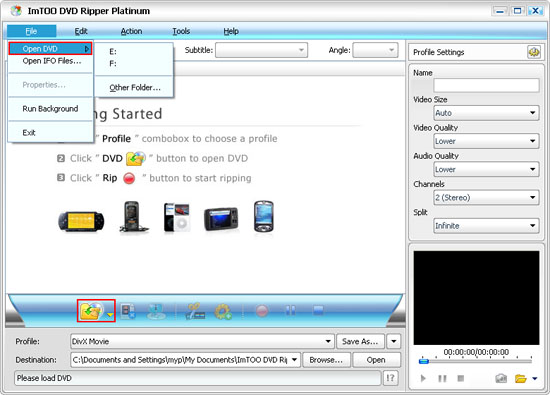
2. Load your DVD movie from targeted drive by clicking on the 'Open DVD' option of the 'File' menu or the 'Open DVD' button of the main interface.
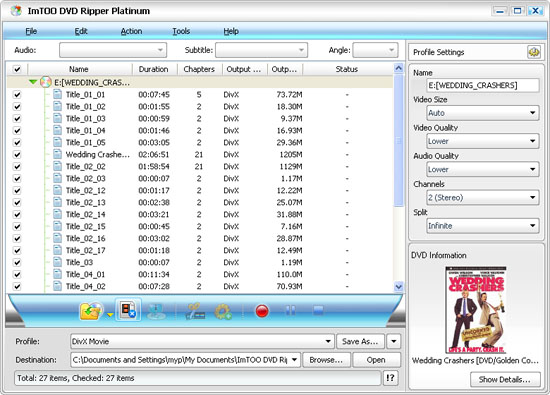
All files from DVD disc are uploaded as the following picture:
Tips:
a. By clicking on the "Show Chapters" option of the "Edit" menu, let the software show or hide Chapters.
b. Two main modes to convert DVD
One is title mode (converting the whole DVD to one file), the other is chapter mode. After loading the DVD to the dvd Converter software, you can click on the "Show Chapters" option of the "Edit" menu. This option helps you switch the display between titles and chapters. If you convert in chapter mode, you will get a file for every chapter. When the list box displays the titles not chapters you can convert the whole DVD into one file.
c. The red button is to start converting.
3. Now we may select the output format from the 'Profile:' drop list box. ImTOO DVD to Video Platinum is the most powerful DVD Converting tool I had ever seen. It can convert DVD to all popular video and audio formats, such as convert DVD to iPod, DVD to PSP, DVD to AVI, DVD to MPEG, DVD to DivX, DVD to 3GP, DVD to MP4, DVD to WMV, DVD to MP3, DVD to WMA.
To show its strong functionality, here I select different output format for each chapter such as MP3, iPod video, PSP video, AAC, MPEG, MOV, Mobile video/audio, etc.
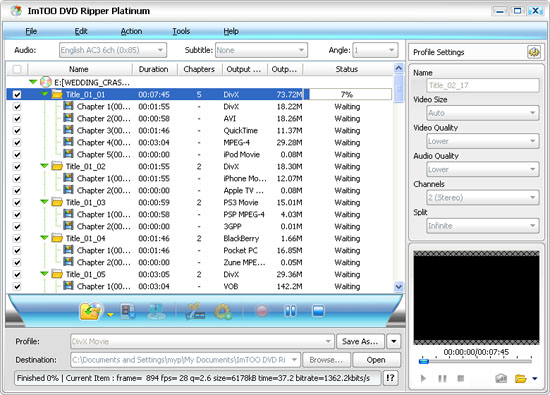
4. (Optional) The settings of output format are adjustable, which may be found on the right string. Converting clip, video size, Bit Rate, Frame Rate, and Sample Rate may be all set according to special needs.
5. Click on the 'Browse' button to select the output folder or directly enter the output folder.
ALL settings have been completed, just click on the red button to start converting.
>>>
How to transfer iPod video to your iPod
Set 'iPod' as output format: Before converting DVD to iPod MP4 video format, please make sure the 'Profile' is 'iPod(320×240)MPEG-4'.
Playback the iPod video files: After converting video files to MP4, find the .mp4 file and drag it into your iTunes library, or select 'Add File to Library' from the 'File' menu and select the encoded movies. You can watch it with iTunes (Free) or Quicktime Player (Free) on your PC.
Sync to iPod: Click 'File -> Update iPod'.
Tip: You can download iTunes + Quicktime Player package from http://www.apple.com/quicktime/download/win.html

Featured Guides
Guides Categories
Video/Audio Guides
- 4Media Audio Converter Pro Tutorial
- 4Media Movie Editor 6 Tutorial
- Video Converter Ultimate Tutorial
- How to convert DAT to other videos
DVD/CD/Blu-Ray Guides
- 4Media Blu Ray Converter for Mac Tutorial
- How to convert Blu-ray disc to video files
- How to burn AVI, MPEG, VOB, DAT, M2V, MPG to DVD on Mac
- How to burn DivX to DVD on Mac
iPod Guides
- 4Media iPod Max Guide
- How to convert AVI, MPEG to iPod MP4 format
- Guide: 4Media iPod to PC Transfer
- How to convert DVD to iPod on Mac
iPhone Guides
- 4Media iPhone Contacts Transfer for Mac Tutorial
- 4Media iPhone Contacts Transfer Tutorial
- 4Media iPhone Ringtone Maker for Mac Tutorial
- 4Media iPhone Max Guide
iPad Guides
Youtube/Online Video Guides
- 4Media Online Video Converter for Mac Guide
- 4Media Online Video Downloader for Mac Guide
- 4Media Online Video Converter Guide
- 4Media Online Video Downloader Guide
PPT/PDF Guides
Others
Articles
- How to download YouTube videos for free
- How to download/convert YouTube videos to iPod
- How to download and convert YouTube videos
- All features of apple iPhone
- Now you can get more TV offerings from Apple iTunes
- Video Streamer HAVA from Snappy Multimedia
- iPod Growth Driving Demand for Flash Memory
- MediaMan HVX-3500 Review
- Uncertain whether new iPod will be delayed or not because of hurdles
- T3's top five iPod alternatives
- Envivio Exhibits MPEG-4 Solutions from Mobile to HD at CCBN2006