


4Media DVD to Video Ultimate for Mac Tutorial


4Media DVD to Video Ultimate for Mac is powerful and easy-to-use DVD converting software with the ability of converting DVD to almost all video and audio formats on your Mac computer. With its powerful compatibility for iPod, iPhone, PSP, Apple TV, etc., 4Media DVD to Video Ultimate for Mac enables you to convert DVD to various portable media players supported formats.
Additionally, it can help you clip DVD segment, crop DVD size, edit DVD effects, add audiotracks and edit subtitles, and add DVD watermark, to get the customized DVD video and audio files.
This article includes 6 parts.
Part 1: Getting Started
Part 2: Clip Video Segments
Part 3: Create Merged Item
Part 4: Edit Merged Video Item
Part 5: Add and Edit Video Effects
Part 6: More Applied Functions
Firstly, download 4Media DVD to Video Ultimate for Mac and then install and run it.
Step 1: Install and run the software
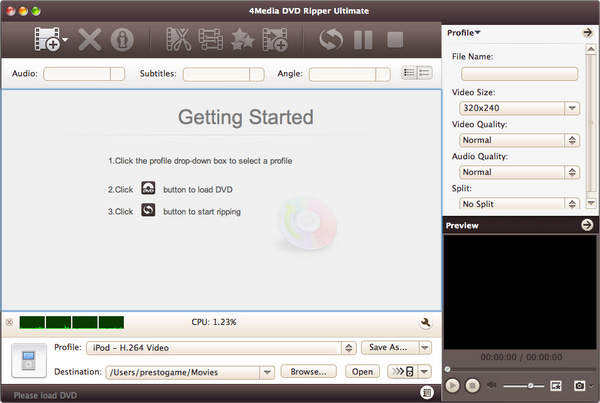
After installation, run the software. You can see the main interface as below.
Step 2: Add Files
Click "Add File(s)" button on the toolbar or select "File> Add File(s)" on the main menu to load DVD.
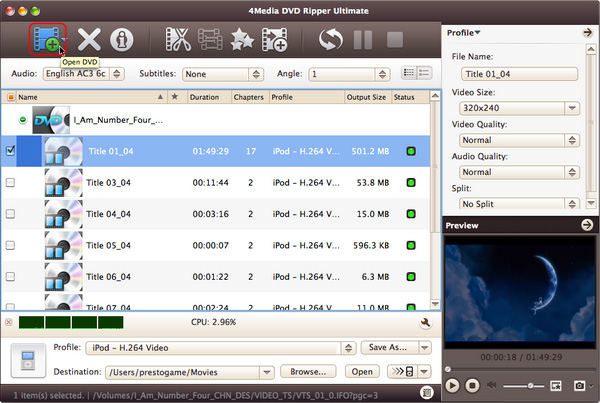
Or, click "Add File(s)" drop-down button, select "Other Folder..." option, select a DVD folder in the file dialog box that opens, and load it.
Click "Add File(s)" drop-down button, select "Open IFO Files..." option, select an IFO file in the file dialog box that opens, and load it.
Step 3: Select output format
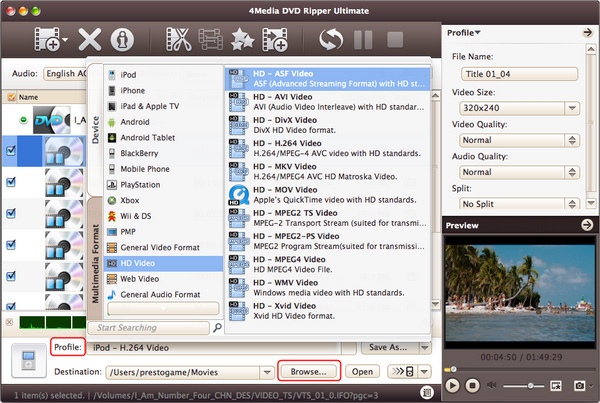
Select the files need to be converted and click "Profile" button to select the output format in the drop-down list. Then click "Browse…" button to specify destination folder for saving output files.
Tips:
1. We provide abundant profiles compatible with various popular devices. Especially all-around HD video formats are supported.
2.Many options for you to choose. The "Recently Used" option can record your recent usages automatically and it is convenient to use them again.
3.Search for the wanted profile quickly by entering the profile keyword in "Start Searching" textbox of the profile list.
Step 4: Convert
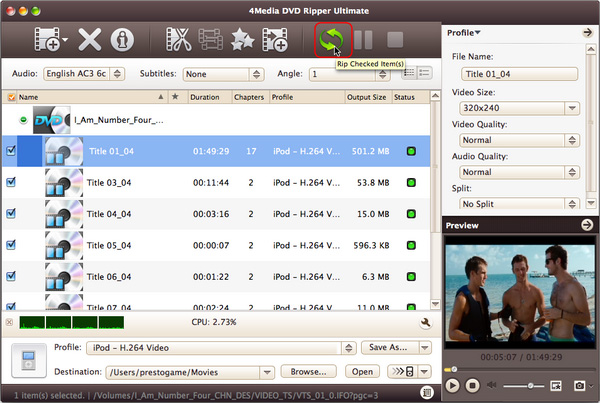
After selected output profile, you only need to check the files you want to convert in the file list and click "Convert Checked Item(s)" button on the toolbar to complete the task.
Ok, the above is the simplest function in conversion. We provide you more functions as below!
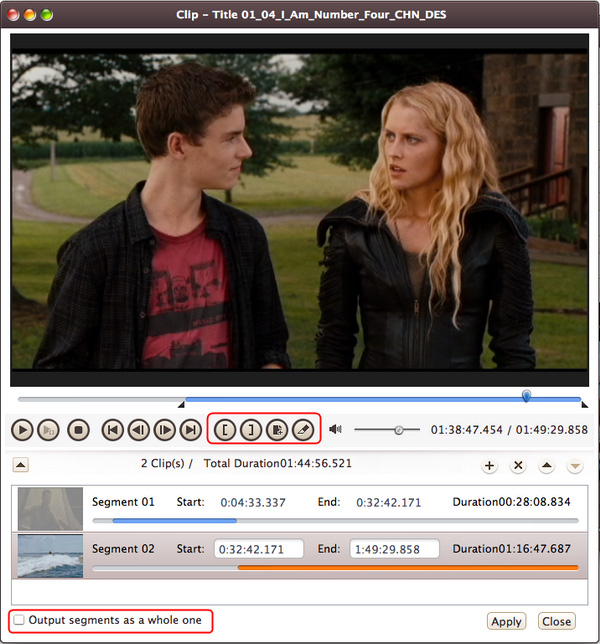
At first, choose a video file you want to clip. Then click "Clip" button on the toolbar to enter "Clip" window. Set the start & end point to get the partial segment and repeat the action to get several segments at will. After clipping, check the "Output segments as a whole one" option and merge the segments in the list into one file. And then click "Move Up" or "Move Down" button to specify the sequence of these segments.
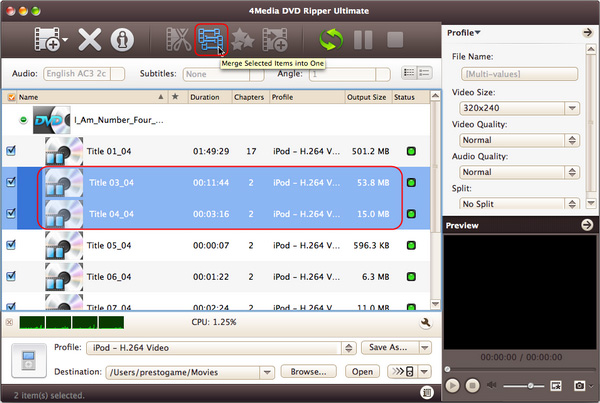
Select multiple files and click "Merge Selected Item into One" button on the toolbar to merge the selected files into one and create a merged item in the file list.
Part 4: Edit Merged Video Item
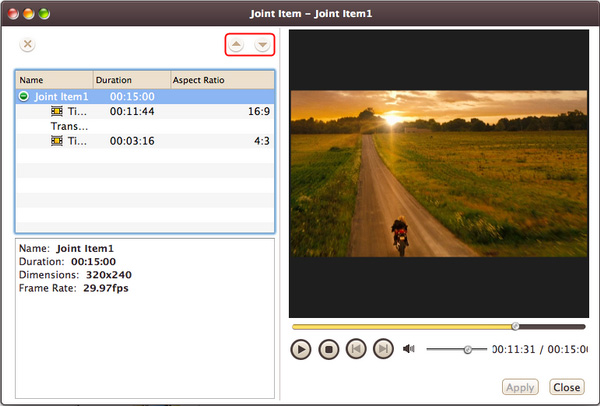
Firstly, right-click a merged video item in the file list, and select "Edit Joint Item" option from the right-click menu to open "Joint Item" window. Then select a video transition item and choose a transition effect from the transition panel on the left. Repeat this step to add transition effects to other videos. After adding transitions, choose a time length from "Duration" drop-down list as the transitional duration, and use "Move Up" or "Move Down" option to adjust the order of video items.
Tips:
1. From "Settings" drop-down list, choose "Restore Defaults" to restore the default. Or select "Apple to All Transitions" to apple the above settings to all the sub-items in this joint item.
2. On the right preview panel, click "Play" button to preview the merged items with the added transitions.
Part 5: Add and Edit Video Effects
Firstly, choose the video you want to edit, and then click "Effects" button on the toolbar to enter "Effect" window.
1.Crop the video size
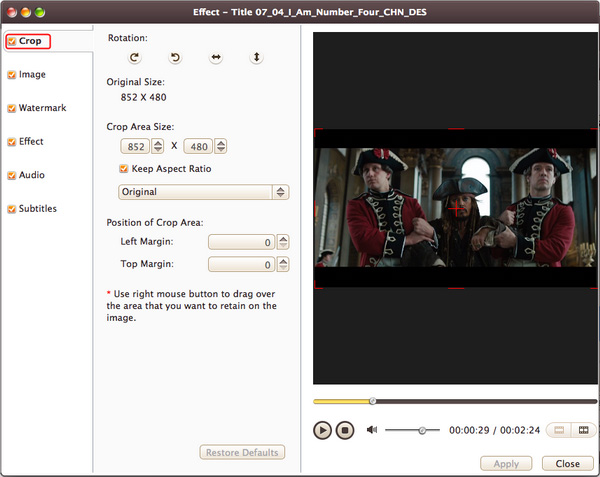
On "Crop" tab, enter height, width, left margin and top margin values to set the size and the position of the crop area. You can also adjust the crop area size and position by dragging the resizable handle and frame.
Besides, you can also check "Keep Aspect Ratio" option and choose the aspect ratio from the drop-down list. Click "Restore Defaults" to restore all settings to default, and preview the real-time effect in preview window on the right.
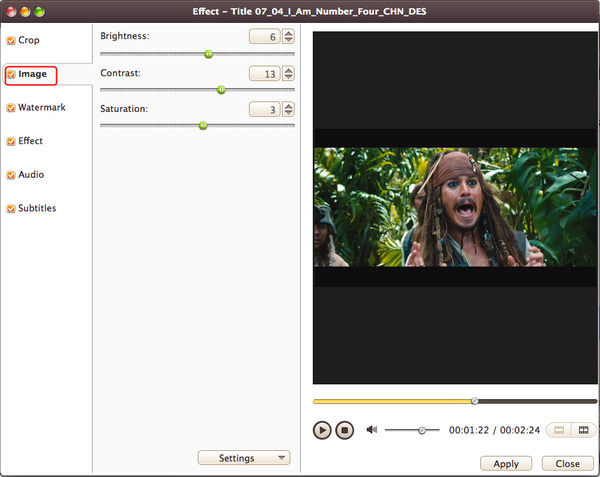
2.Edit video image
On "Image" tab, enter the value of the brightness/contrast/saturation in corresponding textboxes to set the video image's brightness/contrast/saturation.
3. Add watermarks to video
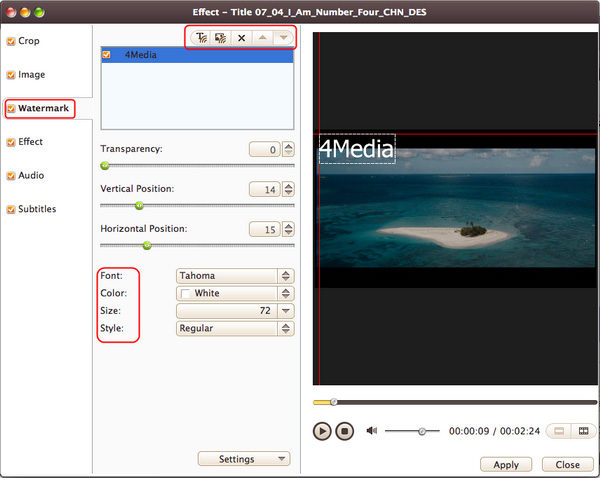
In "Watermark" tab, click "Add Text Watermark" or "Add Picture Watermark" button to import watermarks into the watermark list. Select a watermark and set its transparency, vertical position, horizontal position, font, color, size or style.
Tip: You can add multiple picture and text watermarks into one video simultaneously.
4. Add Effect to video
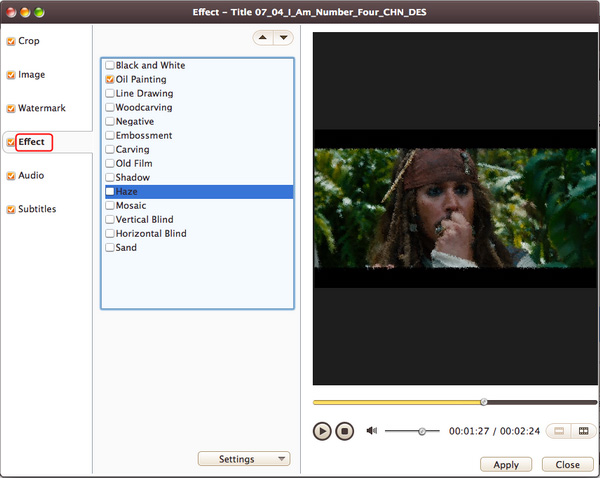
In "Effect" tab, choose one or more effects for the output video from the effect list.
5. Add background music to video
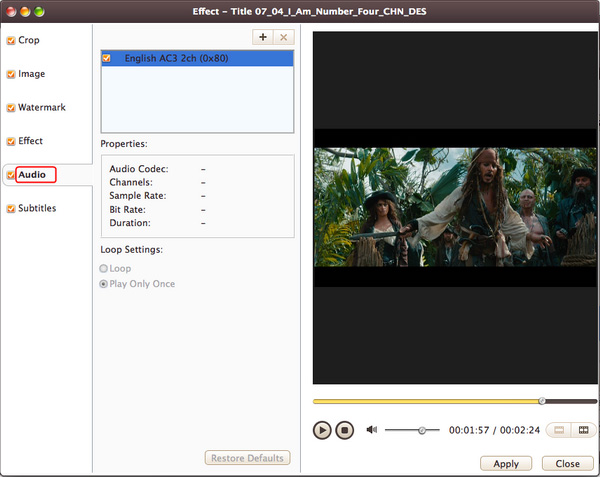
In "Audio" tab, click "Add Audio Track" button to add audio tracks into the list. And then choose the wanted one from the list as the background music for the video. You can also set the play mode as "Loop" or "Play Only Once".
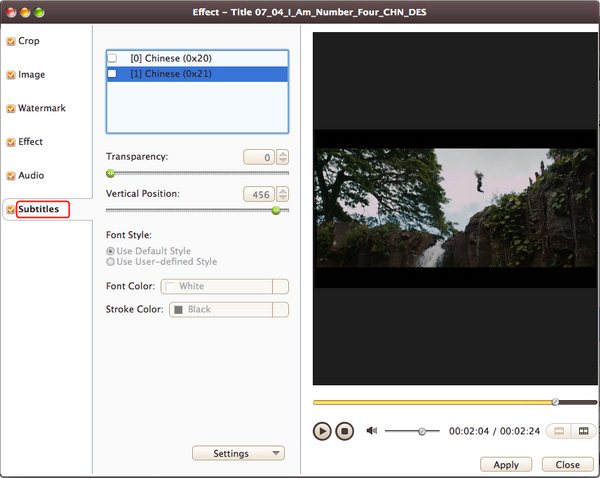
6. Add and adjust subtitle to video
In "Subtitle" tab, click "Add Subtitles" button to load the desired subtitles into the list. Then select a subtitle from the list and adjust its transparency, vertical position, font, color, size, style and line spacing at will.
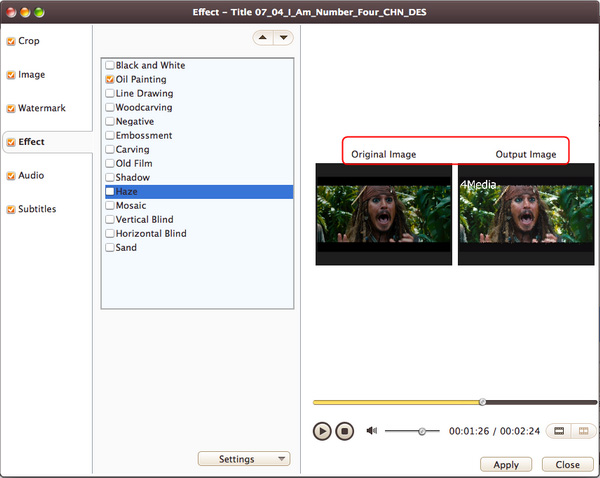
7. Compare the edited video with the source one
Click "Comparing Preview" button on the right preview panel to compare the edited file with the source.
Part 6: More Applied Functions
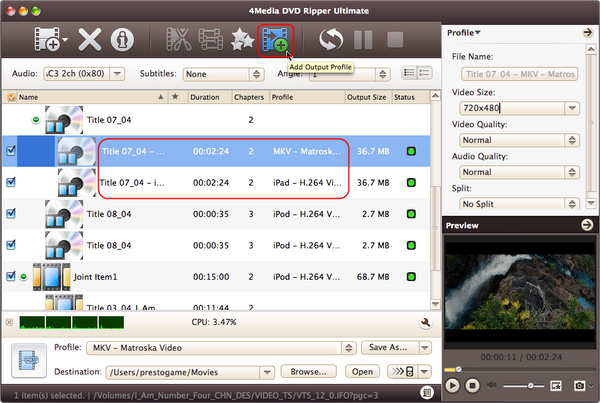
Add profiles for the same video file
Select the video and click "Add Output Profile" button to set multiple output formats for one file simultaneously. You can get different video formats for various digital players after conversion.
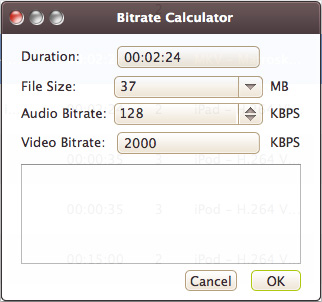
Gain exact video file size using bitrate calculator
To custom output size, select the video file and click "Tools > Bitrate Calculator" and input value to get exact video size.
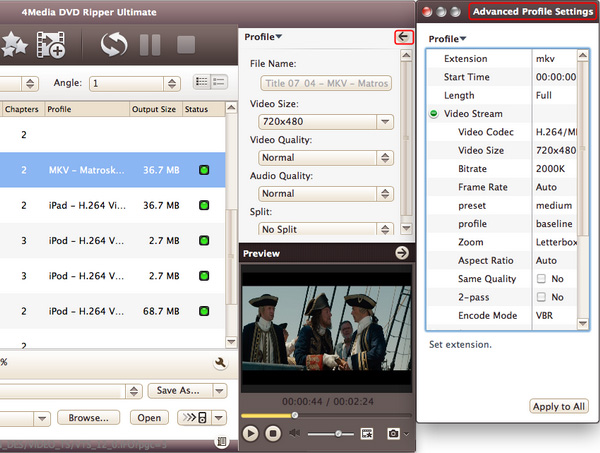
Advanced parameters and settings Provided
Adjust output parameters include bit rate, frame rate for fluency, sample rate, audio channel, codec and many more.
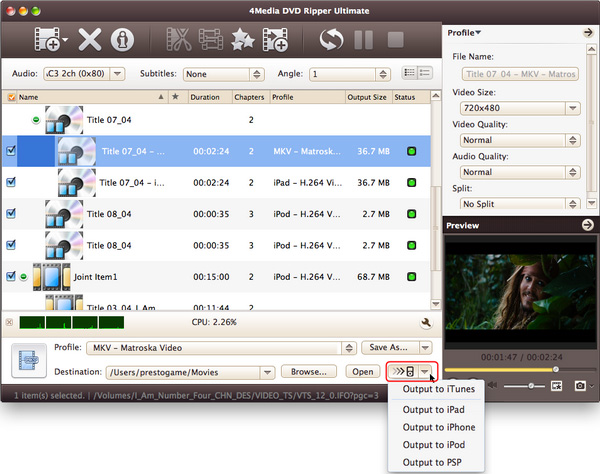
Transfer to the devices after conversion
You can directly transfer the converted files to iTunes, iPad, iPhone, iPod, and PSP after the conversion.
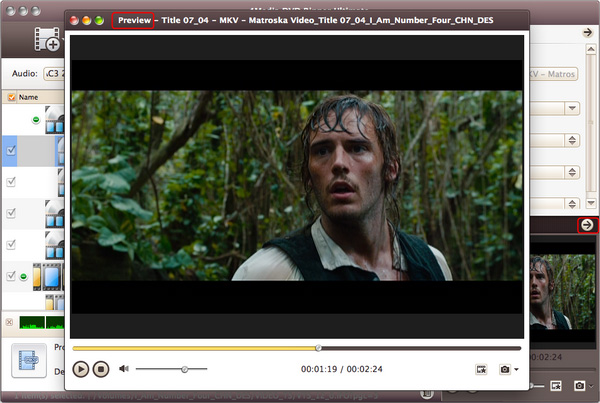
Real-time video previewing
Preview and compare the source video with the edited version in real-time. Take snapshots of movie images while previewing.

Featured Guides
Guides Categories
Video/Audio Guides
- 4Media Audio Converter Pro Tutorial
- 4Media Movie Editor 6 Tutorial
- Video Converter Ultimate Tutorial
- How to convert DAT to other videos
DVD/CD/Blu-Ray Guides
- 4Media Blu Ray Converter for Mac Tutorial
- How to convert Blu-ray disc to video files
- How to burn AVI, MPEG, VOB, DAT, M2V, MPG to DVD on Mac
- How to burn DivX to DVD on Mac
iPod Guides
- 4Media iPod Max Guide
- How to convert AVI, MPEG to iPod MP4 format
- Guide: 4Media iPod to PC Transfer
- How to convert DVD to iPod on Mac
iPhone Guides
- 4Media iPhone Contacts Transfer for Mac Tutorial
- 4Media iPhone Contacts Transfer Tutorial
- 4Media iPhone Ringtone Maker for Mac Tutorial
- 4Media iPhone Max Guide
iPad Guides
Youtube/Online Video Guides
- 4Media Online Video Converter for Mac Guide
- 4Media Online Video Downloader for Mac Guide
- 4Media Online Video Converter Guide
- 4Media Online Video Downloader Guide
PPT/PDF Guides
Others
Articles
- How to download YouTube videos for free
- How to download/convert YouTube videos to iPod
- How to download and convert YouTube videos
- All features of apple iPhone
- Now you can get more TV offerings from Apple iTunes
- Video Streamer HAVA from Snappy Multimedia
- iPod Growth Driving Demand for Flash Memory
- MediaMan HVX-3500 Review
- Uncertain whether new iPod will be delayed or not because of hurdles
- T3's top five iPod alternatives
- Envivio Exhibits MPEG-4 Solutions from Mobile to HD at CCBN2006