


How to: Download TV, Convert TV Progamme to iPod Video using Free Software? - Mp4 Converter
Many TV fans were not happy when they missed their favorite TV episodes, today I'm going to tell you a good way to solve this problem, use free software to download and convert TV, let you watch it on iPod anytime.
Videora has recently released a freeware the Videora iPod Converter. Through this tool you can make almost any video iPod ready. In this case we can realize our own objective, to automatically download TV using Bittorrent and convert it to an iPod supported format.
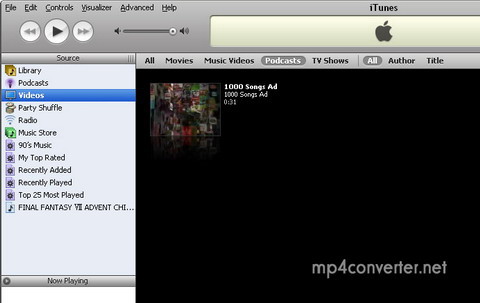
Step 1
Download a BroadCatching System, then install. This progamme will automatically download the TV.
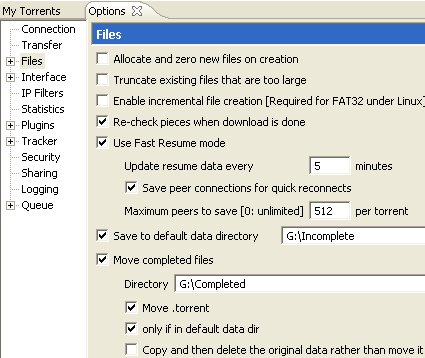
Bear in mind two important things you need to configure in Azureus. Choose"Tools->Options". Check the box next to "Save to default data directory". Select a directory where you want to save your files. Check the box next to "Move completed files". Then choose a directory to save your TV shows. Click "Save".Then we have finished the configuration.
Step 2
To automatically convert the videos you will need to install both Videora and the Videora iPod Converter. We won’t be using Videora, but it needs to be installed for the xCasting option to turn on.
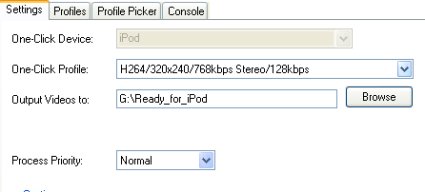
After you get the Videora iPod Converter installed there are only a few more things to set before you’re ready to go. Click on “Setup”. Choose a directory where you would like the iPod ready files to be placed.
UPDATE: The H.264/AVC profiles do not work with the iPod. Choose either SP or MPEG4.
Step 3
For xCasting you need to select where you installed Videora before you can configure it. Check the box for “Automatic Queuing” and choose the directory where your completed downloads are stored. Pick a time interval to check the directory. Click “Save”.
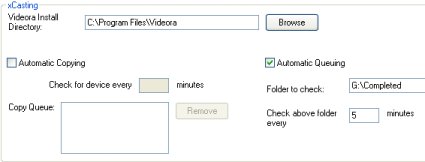
Now anytime when a new file appears in your “completed” directory, Videora will automatically add it to its conversion queue. After the files have been successfully converted they will be placed in your other folder, ready to be transferred to your iPod. The converter can automatically copy the files to your device, but we were unable to test this feature since Apple is still telling us they’re “Processing Order”.
Good Luck to you!

Featured Guides
Guides Categories
Video/Audio Guides
- 4Media Audio Converter Pro Tutorial
- 4Media Movie Editor 6 Tutorial
- Video Converter Ultimate Tutorial
- How to convert DAT to other videos
DVD/CD/Blu-Ray Guides
- 4Media Blu Ray Converter for Mac Tutorial
- How to convert Blu-ray disc to video files
- How to burn AVI, MPEG, VOB, DAT, M2V, MPG to DVD on Mac
- How to burn DivX to DVD on Mac
iPod Guides
- 4Media iPod Max Guide
- How to convert AVI, MPEG to iPod MP4 format
- Guide: 4Media iPod to PC Transfer
- How to convert DVD to iPod on Mac
iPhone Guides
- 4Media iPhone Contacts Transfer for Mac Tutorial
- 4Media iPhone Contacts Transfer Tutorial
- 4Media iPhone Ringtone Maker for Mac Tutorial
- 4Media iPhone Max Guide
iPad Guides
Youtube/Online Video Guides
- 4Media Online Video Converter for Mac Guide
- 4Media Online Video Downloader for Mac Guide
- 4Media Online Video Converter Guide
- 4Media Online Video Downloader Guide
PPT/PDF Guides
Others
Articles
- How to download YouTube videos for free
- How to download/convert YouTube videos to iPod
- How to download and convert YouTube videos
- All features of apple iPhone
- Now you can get more TV offerings from Apple iTunes
- Video Streamer HAVA from Snappy Multimedia
- iPod Growth Driving Demand for Flash Memory
- MediaMan HVX-3500 Review
- Uncertain whether new iPod will be delayed or not because of hurdles
- T3's top five iPod alternatives
- Envivio Exhibits MPEG-4 Solutions from Mobile to HD at CCBN2006